For: PTE Academic learners who want a calm way to follow a transcript, notice genuine audio differences, and avoid uncertain selections
What PTE Highlight Incorrect Words asks you to do
PTE Highlight Incorrect Words practice combines listening with close transcript tracking. Pearson currently includes this task in the Listening section of PTE Academic. A transcript appears on screen while a recording plays automatically, and you select the words in the transcript that are different from the words you hear.
The current official task page lists recordings of 15–50 seconds and states that the audio plays once.
The task contributes to Listening and Reading. You are not rewriting the sentence or correcting its grammar. You are deciding whether each displayed word matches the corresponding spoken word. A transcript may remain grammatically smooth even when one content word is wrong, so meaning, sound, and position all matter.
Selection also needs restraint. Pearson currently awards one point for a correct selection and deducts one point for an incorrect selection in this task. Partial credit applies, but clicking every word that feels slightly uncertain can remove points gained from genuine mismatches. The useful question is not “did that word sound unusual?”
but “did I hear a different word at this exact position?”
This guide is a practice framework, not a set of recalled test questions or an official scoring prediction. It uses original examples and focuses on transferable skills: previewing the topic, following the transcript in real time, comparing sound with text, making evidence-based selections, and reviewing where your attention broke.
| Feature | Current official detail | Practice meaning |
|---|---|---|
| Section | Listening | Prepare to process speech while reading a transcript |
| Prompt | Transcript with some words that differ from the recording | Select displayed words only when the spoken word is different |
| Recording length | 15–50 seconds | Build continuous tracking rather than relying on memory after the audio |
| Playback | Automatic and heard once | Use the preview time and keep moving with the speaker |
| Skills assessed | Listening and Reading | Sound recognition and accurate visual tracking both matter |
| Scoring | Correct selections gain a point; incorrect selections lose a point | Choose with evidence instead of clicking every uncertainty |
Step 1: skim the transcript for topic and shape
Before the recording begins, skim rather than trying to read every word in full. Pearson’s current task tips describe a short preview and recommend focusing on information-bearing words such as nouns, adjectives, and verbs. Use that time to identify the general topic, the approximate sentence structure, and any long or unfamiliar terms that may slow your eyes later.
Notice where clauses begin and end. Commas, full stops, conjunctions, and repeated noun phrases create visual landmarks. If you lose your place during the recording, a landmark such as “however”, a date, or the start of a new sentence can help you rejoin the transcript more quickly than searching word by word from the beginning.
Do not decide that a word is wrong before hearing it. A surprising word can still be exactly what the speaker says. Previewing is for orientation, not prediction. Mark mentally where attention may be needed, then let the recording provide the evidence.
- Name the topic in a few words.
- Notice sentence boundaries and useful visual landmarks.
- Spot key nouns, main verbs, adjectives, numbers, and names.
- Accept unfamiliar vocabulary without guessing that it must be incorrect.
- Place your pointer near the first word before the audio begins.
Step 2: follow the speaker with one visual anchor
When the audio starts, keep one visual anchor moving with the speaker. Pearson recommends following the transcript with the cursor and selecting differences as they are spoken. Your anchor may be the pointer, a light finger movement near the screen, or simply a narrow focus on the current phrase.
The aim is to keep your ears and eyes on the same word position.
Track in short meaning groups rather than isolated syllables. A phrase such as “the final review” is easier to follow as one unit than three separate words. Natural speech links sounds and reduces unstressed words, so waiting for every word to sound as clear as a dictionary recording can make you fall behind.
Keep your gaze near the current word, not several words ahead. Reading too far forward divides attention between the next phrase and the sound happening now. If you are consistently late, practise moving the pointer at the pace of the recording without selecting anything. Stable alignment comes before fast decision-making.
| Moment | Attention | Action |
|---|---|---|
| Before audio | Topic and landmarks | Place the pointer at the first word |
| During a phrase | Current meaning group | Move smoothly with the speaker |
| Possible mismatch | Exact spoken and displayed word | Select only when the difference is clear |
| After a selection | Next spoken phrase | Return to tracking immediately |
| After losing place | Next strong landmark | Rejoin instead of reading backwards |
Step 3: compare the spoken word with the displayed word
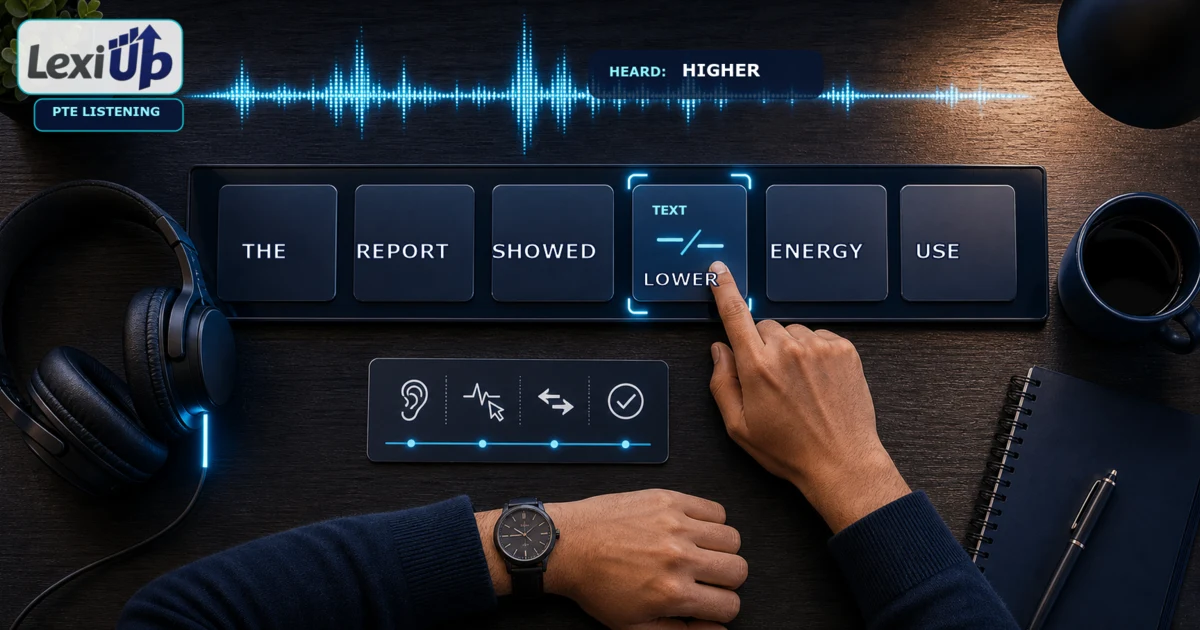
A mismatch can involve meaning, grammar, or a similar sound. In an original example, the audio may say “The report showed higher energy use” while the transcript shows “The report showed lower energy use.” Both sentences are grammatical, but the key adjective changes the message.
You must select the displayed word “lower” because it differs from the spoken word at that position.
Listen for complete word identity, not just the first sound. “Economic” and “economical” begin similarly but have different endings and roles. “Adapt” and “adopt” differ in one vowel. A plural ending, past-tense ending, or negative prefix can also change the displayed word. Train yourself to hear the point where the two forms separate.
Use meaning as confirmation, not as a substitute for listening. If the transcript says “prices increased” while the surrounding message describes a fall, the meaning raises a useful warning. You still need to hear the different spoken word. A sentence can contain an unexpected idea without containing a transcript error.
- Meaning change: higher versus lower.
- Word-family change: economy versus economic.
- Sound-neighbour change: adapt versus adopt.
- Grammar change: improve versus improved.
- Number change: result versus results.
- Polarity change: possible versus impossible.
Step 4: select, release, and keep moving
When a difference is clear, select the displayed word and immediately return your attention to the next spoken phrase. Do not replay the mismatch mentally while the recording continues. One confirmed word should not cause you to miss the next ten. The action needs to become short: hear, compare, click, release.
If you are uncertain, keep tracking. The current scoring rule makes an unsupported click costly, while the audio continues to provide new opportunities. You can sometimes change a selection by clicking the word again, but you cannot replay the recording. Protecting alignment is usually more valuable than stopping to debate one doubtful sound.
Separate confidence from familiarity. A common word is not automatically correct, and an unfamiliar word is not automatically wrong. Confidence should come from hearing a different word at the same transcript position. During practice, use three labels after the item: clear difference, possible difference, or tracking loss. Only the first label represents a selection you could explain confidently.
| Evidence | During the task | Review label |
|---|---|---|
| Clearly heard a different word | Select the displayed word | Confirmed mismatch |
| Only the meaning felt unusual | Keep listening unless the sound also differs | Meaning warning |
| Could not hear the ending | Avoid a guess and maintain position | Sound detail |
| Lost the transcript position | Rejoin at the next landmark | Tracking loss |
| Clicked by mistake | Deselect if the interface and timing allow | Control error |
Step 5: recover quickly when you lose your place
Losing one phrase does not need to end the item. Stop scanning backwards because the speaker is already moving forward. Look for the next strong content word, number, name, sentence boundary, or repeated phrase that you can hear and see together. Rejoin there, then resume normal tracking.
Use clause boundaries as recovery points. If you miss part of a long sentence, listen for a pause or connector and search just ahead for that visual shape. A full stop is especially useful because the next sentence normally gives you a fresh alignment point.
The goal is not to recover every missed word from memory; it is to prevent one gap from becoming the rest of the transcript.
Practise recovery deliberately. Play an authorised short recording with its transcript, look away for one second, then rejoin at the next landmark. This teaches a practical response to attention slips. It is more useful than repeating only perfect, slow exercises where you never experience losing position.
- Accept that the missed phrase has passed.
- Listen for the next strong content word or boundary.
- Scan a short distance ahead, not back to the beginning.
- Match one heard landmark with the same displayed landmark.
- Resume phrase-level tracking without reviewing the gap.
Step 6: review the first attention break
After each practice item, do not begin by counting only correct and incorrect selections. Find the first point where your process broke. You may have misheard a similar vowel, followed the wrong line, read too far ahead, paused too long after clicking, or selected a word because its meaning seemed unlikely.
Naming the first break gives you one repair target.
Compare the audio and authorised transcript at that exact position. Write the spoken word, the displayed word, the sound or meaning difference, and the reason for your decision. If you lost place, record the landmark that could have helped you return. Keep the note short enough to use before the next session.
Then test the same skill on a new sentence. A single replay of the familiar item can become a memory test. Near-transfer practice is stronger: use a new contrast such as increase/decrease, singular/plural, or a word-family ending.
LexiUp PTE can support independent practice and review, but it is not Pearson, does not issue official scores, and cannot guarantee a test result.
| Field | Example | Next action |
|---|---|---|
| Displayed word | lower | Keep the exact visual form |
| Spoken word | higher | Replay only in authorised practice |
| Difference type | Meaning opposite | Practise direction and polarity pairs |
| Process break | Paused after clicking | Use hear–click–release rhythm |
| Recovery landmark | Start of the next sentence | Practise rejoining after a short gap |
Step 7: use a focused PTE Highlight Incorrect Words practice routine
A focused PTE Highlight Incorrect Words practice session can fit into twenty minutes. Start with three minutes of transcript tracking without selecting words. Use six minutes for short sound contrasts and word endings.
Complete three authorised items for seven minutes, then spend the final four minutes reviewing the first attention break and testing that skill on one fresh sentence.
Rotate the difficulty across sessions. One day can focus on similar sounds, another on word families and endings, another on staying aligned through longer sentences, and another on conservative selection. Mixed practice becomes more useful after you can name the source of common errors.
Use authorised recordings, licensed preparation material, public audio with accurate transcripts, or original recordings you create for practice. Do not rely on recalled live-test content. The task rewards real-time comparison, so memorising a familiar error position does not prepare you to track a new recording.
Track process evidence rather than inventing a score forecast. Useful measures include how long you stayed aligned, how many selections you could justify, how often an unsupported click occurred, and whether you recovered after losing place. Use Pearson’s current materials for official task and scoring information.
Build difficulty in three layers. Begin with a clear recording and a transcript split into short sentences. Next, keep the transcript visible but use natural speech with connected sounds and a wider range of accents. Finally, use a longer authorised item where the speaker maintains a steady pace.
Change only one difficulty at a time so you can identify whether the problem comes from sound recognition, reading speed, or attention control.
A partner can create safe original practice without copying assessment content. Ask them to write a short neutral paragraph, record it, and replace two or three transcript words with alternatives that keep the grammar natural. Complete the comparison once, then check the original script together. Rotate opposites, word-family endings, number changes, and similar sounds.
This keeps the practice fresh while making the answer evidence transparent.
End the session after one successful repair. If you repeatedly lost position after clicking, finish with a fresh sentence where you select one clear mismatch and immediately follow the next phrase. If endings caused the problem, finish with a new singular-and-plural contrast.
A short, correct application of the repaired skill gives the next session a clear starting point and prevents review from becoming a list of mistakes.
| Time | Activity | Evidence saved |
|---|---|---|
| 0–3 minutes | Follow a transcript without clicking | Longest stable tracking stretch |
| 3–9 minutes | Compare sound-neighbour and word-ending pairs | Difference you heard clearly |
| 9–16 minutes | Complete three authorised items | Selections you can explain |
| 16–20 minutes | Review one attention break and retry fresh material | One repair to carry forward |
Common mistakes to avoid
The first mistake is reading the transcript word by word before the audio. This uses the preview time without building a useful map and can make you late for the opening phrase. Skim for topic, structure, and landmarks, then place your attention at the start.
The second mistake is clicking a word because it seems strange. The task asks whether the transcript differs from the recording, not whether the sentence matches your expectations. Hear the corresponding spoken word before selecting. The third mistake is continuing to analyse a mismatch after clicking it. Release the decision and follow the next phrase.
The fourth mistake is trying to recover a missed phrase by reading backwards. Rejoin at a new landmark instead. The final mistake is reviewing only the answer key. Record why you misheard, mis-tracked, or over-selected, then practise that exact process on fresh material.
- Do not turn the preview into a full slow read.
- Do not select a word from meaning alone.
- Do not confuse an accent or reduced sound with a different word.
- Do not remain mentally on a mismatch after clicking it.
- Do not read backwards while the speaker continues.
- Do not review only the final number of correct answers.
Frequently asked questions
Is Highlight Incorrect Words in PTE Academic or PTE Core?
This guide is for PTE Academic. Pearson’s current Academic Listening page describes the transcript-difference task used here. The current Core page contains inconsistent public wording under the same heading, so Core learners should confirm the latest task instructions in their official booking and preparation materials.
How is PTE Highlight Incorrect Words scored?
Pearson’s current PTE Academic task page states that correct selected words receive one point and incorrect selected words lose one point. Partial credit applies, so select only when you have evidence of a real difference.
Should I read the whole transcript before the audio?
No. Use the preview to skim the topic, sentence boundaries, and key content words. Then return to the first word so your eyes and ears begin in the same position.
What should I do if I lose my place?
Do not read backwards. Listen for the next strong content word, number, name, connector, or sentence boundary, find the same landmark on screen, and continue from there.
Does LexiUp provide an official PTE score?
No. LexiUp PTE is independent preparation support. It is not affiliated with Pearson, does not issue an official score report, and cannot guarantee an exam result.
Sources and review note
This guide was reviewed against the sources below. LexiUp remains independent of the exam owners.